


Reportum
Saving users over 75% of their time with automation
Ai translation for a 14 language interface
Reportum is a drug side effect platform managing intake of digital reports across global sources and languages.
Users can globally report a side effect using the Reportum interface which is rendered in 14 languages. For compliance and data processing, all intake has to be translated into English before being sent to a database.
This project was to improve the UX of our existing translation feature to reduce the amount of time it takes a user to translate a report.
Role
Lead Product Designer
Design Team
Myself + Mid-weight designer
Collaboration
Customers, Product Managers, Engineers, CS & Sales
The biggest UX challenge and goal
How can users see both the original language of the report and the english translation on the same page, to easily compare and translate data points.
How I revamped an existing feature
Discovery
Uncovering needs
This project started off with some internal discovery on technical feasibility with the product and development team. As the system has stored labels in English for some inputs (e.g. buttons, checkboxes and radio buttons), we knew we had to focus the piece on auto-translation for any free text data entry in our forms.
We received feedback from customers that they wanted a quicker way to do this tedious task, it was the main part of the process that was slowing them down. We added this into the roadmap to improve the retention of the product, so users can quickly manipulate the data rather than waiting for someone to translate it.

Aligning on the outcomes
We kicked off the project by interviewing all customers that currently use this feature to understand their pain points further, which resulted in a user journey.
We decided our MVP will focus on "Japanese" language reports to start with. Then we will role out to more languages.
As an outcome of synthesising all research in dovetail we uncovered a high level goal :
As a user I want to the system to auto translate all of my reports so I can do a more efficient review and save time.

User Journey - What, Why and Hows
Ideation and prototyping
Let's bring this to life
We started ideation, sketching out ideas, wireframing and then bringing them to life in Figma. We reviewed designs internally for feasibility working closely with the engineers.
We used the side by side view to show the original language of the report and the input fields to enter into English as this was one of the main pain points in the existing design.
We conducted usability tests on 5 customers to understand if we are improving the value and mitigate usability risks.

Initial design
Some of our findings
Improvements
It takes a long time to go through each page of the form and check if the translations are correct.
If some fields are 100% match, I do not need to edit these and I do not want a human to accidentally make a mistake and edit this information.
The users were able to quickly find the fields they needed to translate, there was a lot of scrolling and looking left to right.
Putting our findings into action
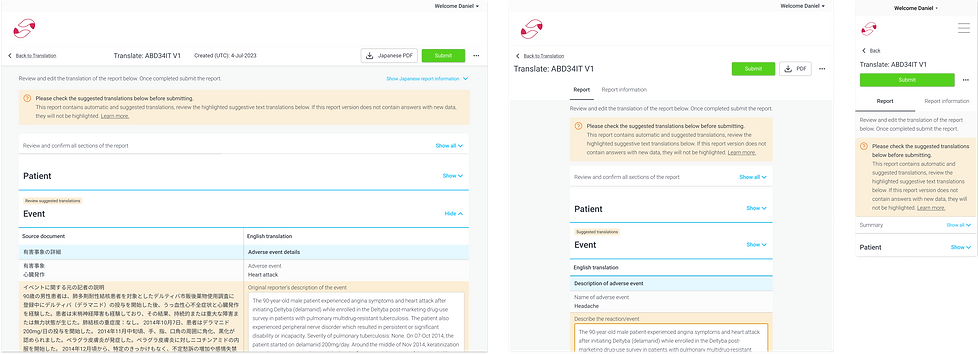
We analysed the feedback in Dovetail and synthesised it. We then made updates to the designs and instead of making the user go through each of the pages of the form, we made a single page view with the fields they need to focus on highlighted. We also made it clearer which sections of the form had translations using tags.
We then conducted a final round of usability testing and mitigated our design risks during an in person workshop in Japan which we were doing for another project.

Single full page experience

Orange background highlighting focus fields
We finalised the designs by creating specifications and updating the Pill design system. We worked closely with the engineers to make sure all scenarios and states were captured in the designs.
We also defined responsive designs from Mobile, 360px until Desktop, 1920px.
Measuring impact
How did this actually perform?
Customers said that this will reduce around 75% of the time to finish this task. The translation quality was almost accurate, giving them a lot of faith that Reportum can automate processes for them.
Meaning they could focus on more important tasks like processing the safety information in the report.
Saving
~70%
of users time